


Fishbrain - Fishing App
4.515.84K Reviews
App Specs
- Version
- 11.63.0
- Updated On
- License
- Free
- Downloads
- 10,000,000+
- Developer
- Fishbrain
- Categories
- Sports
- Platform
- Android, iOS
Screenshots
 Analysis by AppCompare
When I plan a fishing trip, I want help finding a promising place without turning the outing into a screen-heavy project. That balance is what makes Fishbrain worth a look: it brings fishing maps and an angler community together, while leaving the actual decisions about where and how to fish in my hands. I see it as a useful companion for people who enjoy comparing notes, not as a guarantee of a bite.
What I expect from its pace
Fishbrain is a fishing app from developer Fishbrain, and its mix of maps, catch posts, and angler information gives it more to load and explore than a simple offline notebook. I would approach it as a planning tool rather than something I need to consult every minute on the bank. A sensible routine is to check a place and its recent context before leaving, then use the phone less once fishing begins.
That distinction matters if you are heading out with limited time or an older phone. Map browsing and scrolling through shared catches are different kinds of activity, and neither is essential to every cast. I’d narrow down a few candidate spots in advance instead of repeatedly opening new areas while travelling. It keeps the outing focused and makes the app’s breadth feel more useful than distracting.
Planning around a busy session
Imagine I have a free morning, a familiar rod, and only a rough idea of where to fish. I can use the map to compare possible locations, look at what other anglers have chosen to share, and decide whether a nearby alternative is worth considering. The practical value is not that a post predicts my result; it is that several pieces of local context can help me make a more informed choice before I set off.
For a more deliberate trip, I’d treat the app as a research layer alongside my own notes. If a spot looks promising, I would remember what made it interesting—its location, the kind of catches anglers discuss, or the conditions I want to check—rather than assuming the same outcome will repeat. Community reports are clues, not promises, and that is a healthier way to use any shared fishing information.
Where the maps and social feed fit
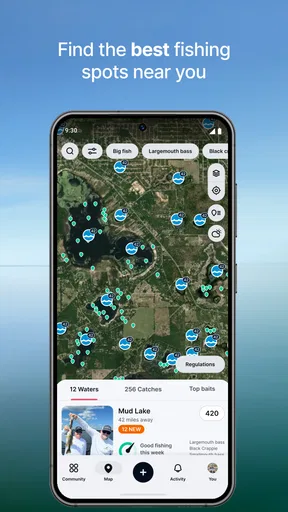
The map is most valuable when I’m unfamiliar with an area or want to compare options without relying only on a broad search. It can help me notice places anglers discuss that I might otherwise overlook. At the same time, a popular-looking location is not automatically the best choice for my preferences, access, or plans. I would use the map to generate possibilities, then make my own call about which one suits the day.
The community adds a different kind of value: it can expose me to local habits, catch reports, and practical observations that a basic map app does not organize around fishing. The trade-off is that shared content varies in usefulness. I’d pay more attention to specific, relevant posts than to a busy feed, and I would avoid treating likes or activity as proof that a location is right for me.
Worth Reading Before You Choose

EA SPORTS FC Mobile 26 Is a Bigger Football Game, but It Takes Time

Flipboard Shows What News Apps Must Do Beyond the Feed

Switching to Android Auto Means Rethinking Your Driving Routine

Google Calendar Makes a Crowded Week Easier to Manage

Ludo King Makes the Most of the Minutes Between Plans

Baby Panda World Brings Quick Play to Modern Phones, but Its Game Library Feels Busy
Free access, paid extras, and a fair comparison
The app is free to download, with in-app purchases ranging from $1.99 to $199.99 per item. That broad spread makes it sensible to explore the free experience first and decide whether any paid option solves a real need for your style of fishing. Fishbrain has a 4.5 average from around 64,000 ratings, and it has been installed over five million times; those figures suggest a widely used product, though they can’t tell me whether its community is active in my particular area.
Compared with a general map app, Fishbrain is more fishing-focused because anglers’ shared activity is part of the experience. Compared with a plain catch log, it offers a wider window into places and other people’s reports. If I only need directions, a standard map may be simpler. If I want a private record with no social browsing, a basic notes app or fishing log may feel more direct. Fishbrain makes the most sense when I actually want both location discovery and community context.
There are practical limits to keep in mind. Posts depend on what people choose to share, so coverage can feel more useful in some areas than others. An unfamiliar stretch of water with little community activity may offer less insight than a well-discussed local spot. I would also check applicable angling rules independently before fishing; an app can help me research, but it should not replace official guidance or good judgement about access and conditions.
It is also worth deciding how much social activity you want. If you enjoy seeing catches and exchanging ideas, the feed can make planning more engaging. If you would rather keep a trip quiet and private, the same stream may feel like unnecessary noise. I’d start by using the map for a concrete purpose, then decide whether browsing and posting add enough to my routine to justify keeping them in the mix.
On the device side, I would keep expectations grounded: a mapping and photo-sharing app is naturally more involved than a text-only list, but I can’t assume every phone or connection will behave the same way. If responsiveness matters on a trip, I’d open the areas I need before setting out, close out of browsing when I’m done, and keep a separate note of essential details. That gives me a fallback if reception or battery becomes a concern, without relying on the app as my only source of trip information.
Reeling in the Features
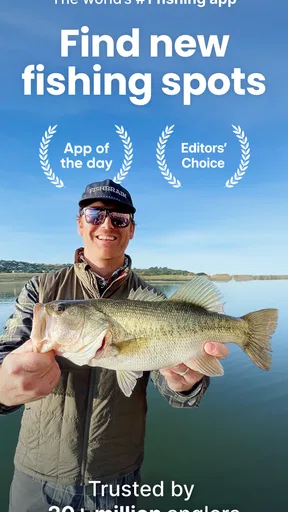
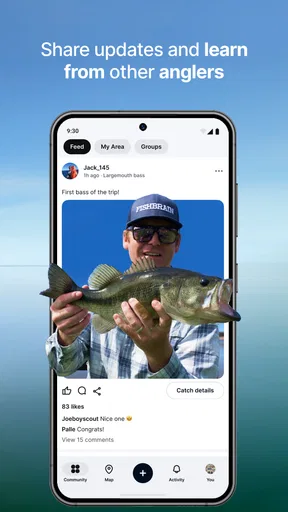
Fishbrain is more than just a fishing app; it’s like a social network for anglers. When you first log in, you'll notice its clean and user-friendly interface. It hooks you up with a community of over 10 million fishing enthusiasts. Yes, you read that right! You can share catches, exchange tips, and even get advice on the best gear to use. It’s like Facebook, but for fishing addicts.
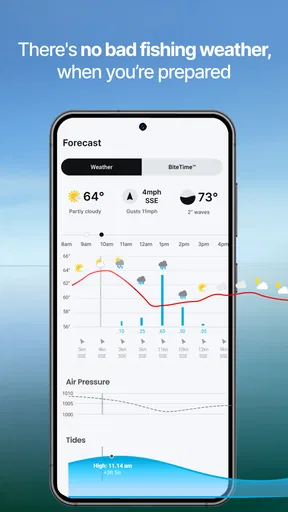
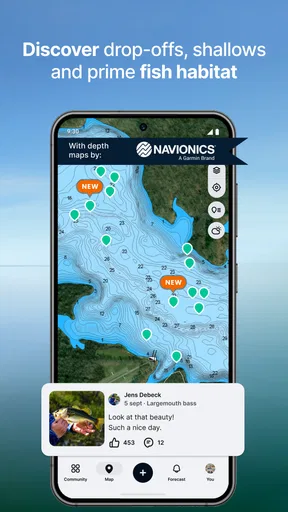
The app offers a detailed map feature, which is a game-changer. You can explore various fishing spots, see where others have had successful catches, and even get weather forecasts to plan your perfect fishing day. It’s a bit like having a fishing guide in your pocket, always ready to point you towards the action.
Catch of the Day: The Premium Experience
If you’re willing to cast a little extra cash, the premium version offers even more goodies. You get access to exclusive fishing forecasts, depth maps, and detailed species information. I gave it a whirl, and it’s impressive how much the additional data can elevate your fishing experience. It’s like going from casual angler to full-blown fishing pro.
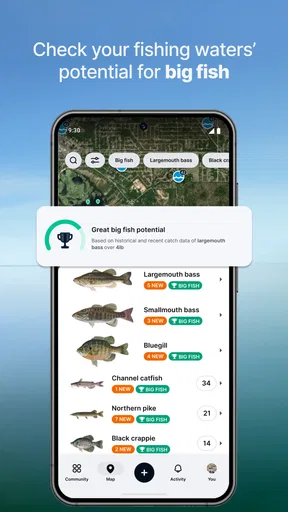
One of the standout features for me is the species recognition tool. Snap a pic of your catch, and the app helps you identify it. It’s like having a marine biologist in your tackle box. Plus, you can track your personal fishing stats, which is a neat way to see how your skills are improving over time.
Hook, Line, and Sinker: The Community Vibe
What really makes Fishbrain shine is its community aspect. Sharing your catches and getting feedback from fellow anglers creates a sense of camaraderie. Whether you’re a seasoned pro or a newbie, there’s always something to learn from others. I found myself scrolling through catch photos and tips like I was on Instagram, but way more fish-focused.
The app also hosts various challenges and competitions, adding a fun twist to your fishing adventures. Who doesn’t love a bit of healthy competition, right? It’s a great way to stay motivated and maybe even discover some new favorite fishing spots.
Swimming Through the Pros and Cons
While Fishbrain is packed with amazing features, it’s not without its quirks. Sometimes the app can feel a bit overwhelming with all its features, especially for beginners. But once you get the hang of it, navigating through becomes second nature.
The social aspect is both a blessing and a curse. While it’s fantastic to connect with other anglers, you might sometimes encounter the occasional spam or less-than-helpful post. But hey, that’s the internet for you!
Final Thoughts: Cast or Pass?
So, should you give Fishbrain a shot? Absolutely! Whether you’re a casual fisherman looking for new spots or a hardcore angler wanting to track every catch, this app has something for everyone. It’s like having a fishing buddy who’s always ready to hit the water, rain or shine.
If you’re curious to see what all the fuss is about, you can snag it for both Android and iOS. Just make sure you’ve got some extra room on your phone – you’ll need it for all those catch photos you’ll be uploading!
Who will get the most from it
I’d recommend Fishbrain most to anglers who like to explore beyond their regular patch of water, or who enjoy learning through other people’s catches and observations. A beginner can use those examples to build better questions about location and technique, while an experienced angler may find the map and shared reports helpful for scouting. Neither group needs to follow every post; the benefit comes from picking out information relevant to a specific trip.
It is less compelling for someone who wants a purely offline tool, a quiet private log, or a simple route to a known fishing spot. In those cases, a paper notebook, a basic notes app, or an ordinary navigation map can be quicker and less distracting. I would also skip the social side if posting and browsing feel like chores rather than part of the hobby.
A more useful way to build a fishing routine
One small habit can make the app easier to use: separate scouting from fishing. Before a trip, compare a couple of possible locations and save the useful details in your own words. At the water, focus on conditions and your own observations instead of constantly checking what other people caught. Afterward, a catch entry or a short note can help you remember what worked, without turning every outing into a reporting task.
That approach also makes the community more valuable over time. A single catch photo may be interesting, but a pattern in your own records can help you distinguish a lucky result from a repeatable choice. I would be cautious about drawing strong conclusions from a small number of outings, though: changing conditions and different water can make comparisons misleading.
Rules, privacy, and local judgement
Location sharing deserves a little thought. Some anglers are happy to reveal a productive spot; others prefer to keep precise locations private. Before posting, I’d consider whether I’m comfortable making that information visible to other users and whether a broad description would be enough to share the useful part of the experience. That choice matters especially for a location I want to keep quiet or where access needs care.
Rules can also vary from one place to another, and a community post is not a substitute for checking what applies where I plan to fish. I’d use the app to discover ideas, then confirm local restrictions and access through appropriate sources. This is a practical boundary, not a weakness unique to Fishbrain: crowd-sourced knowledge is helpful for orientation, but responsibility stays with the angler.
What to expect from the app over time
Fishbrain has been around since February 2013, and the current version is 11.51.0.(23360). It is rated Teen, and it runs on operating systems from version 10 onward. The listing shows 16,000 reviews alongside its rating count, while the free download and optional purchases make it possible to begin without paying. I’d still treat the paid extras as a personal decision, not a necessary step for every angler.
For reliability, I would judge it by whether it helps me prepare, rather than expecting it to replace every other tool at the water. A map or feed may be less useful when local reports are sparse, and any phone-based plan can be affected by the device and conditions around it. Keeping a basic offline note of the destination and checking essential rules separately gives me a simple recovery plan if I cannot use the app at a particular moment.
My performance verdict
My overall view is that Fishbrain is best as a fishing companion for discovery and shared knowledge, not as a must-have instrument for every cast. Its feature-rich approach can feel busy, and how much value it offers depends partly on the activity around the waters you fish. But if you enjoy exploring locations, learning from other anglers, and recording your own outings, it brings those interests together in a way a generic map or private log does not.
I’d try the free experience with one real goal—scouting a new area, checking community reports, or keeping a record—and see whether it earns a place in my routine. If it does, the paid options can be considered on their own merits. If you mainly want simple navigation or prefer fishing without a social layer, a lighter alternative will probably suit you better.
Pros
- Comprehensive fishing maps available.
- Real-time weather updates.
- Extensive community of anglers.
- Catch tracking and logging tool.
- Species identification feature.
Cons
- Requires subscription for premium features.
- App size is relatively large.
- Some features need internet connection.
- Occasional in-app ad interruptions.
- Limited offline functionality.
FAQs for Fishbrain - Fishing App
What features does Fishbrain offer for enhancing my fishing experience?
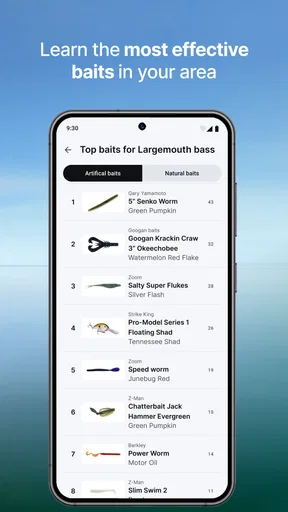
Fishbrain provides a comprehensive set of features to enhance your fishing experience. These include personalized fishing forecasts, a detailed map of fishing locations, species recognition, catch logging, and a vibrant community for sharing tips and experiences. Additionally, it offers gear recommendations and weather updates to ensure you’re well-prepared for your next fishing trip.
Is Fishbrain suitable for both beginners and experienced anglers?
Yes, Fishbrain is designed to cater to both beginners and experienced anglers. Beginners can benefit from tutorials, community advice, and species identification tools. Experienced anglers will appreciate the in-depth analytics, advanced mapping features, and the ability to connect with other skilled fishermen to exchange insights and strategies.
How does Fishbrain’s social component work?
Fishbrain's social component allows users to connect with millions of anglers worldwide. You can follow other users, share your catches, comment on posts, and exchange tips and tricks. The community aspect is a great way to learn from others, share your fishing stories, and stay motivated through friendly competition and support.
Are there any subscription fees associated with Fishbrain?
Fishbrain offers both a free version and a premium subscription plan. The free version provides access to basic features, while the premium version unlocks advanced capabilities such as detailed catch statistics, exact fishing locations, and extended weather forecasts. Subscribing to the premium plan enhances the app’s utility and provides a more comprehensive fishing experience.
How does Fishbrain ensure the accuracy of its fishing forecasts and maps?
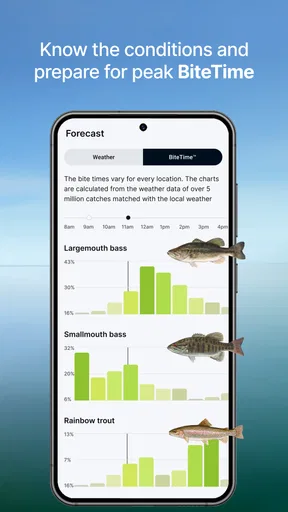
Fishbrain uses a combination of user-generated data and weather analytics to provide accurate fishing forecasts and maps. By analyzing millions of catches and weather patterns, the app predicts the best fishing times and locations. Additionally, the community continuously updates and verifies data, ensuring reliable and current information for all users.


